Quick answer: The fastest local SEO wins for an HVAC company are on your Google Business Profile and your website: set the right primary category and services, fix your hours and service area, add real job photos, ask every customer for a review, give each core service its own page, match your details everywhere, add HVACBusiness schema and track calls.
Key takeaways
- Your primary Google Business Profile category is the top local pack factor in Whitespark’s 2026 Local Search Ranking Factors report, so check it first.
- Google’s guidelines ask for real customer-facing hours, a service area of no more than about two hours’ drive and the fewest categories that describe your core business.
- Ask every customer for a review. Offering discounts for reviews or only asking happy customers breaks Google’s policy.
- Give furnace repair, AC repair, heat pump work and maintenance plans their own pages, and mark up your site with the HVACBusiness type.
- Business Profile call history was removed in July 2024, so track calls with the profile’s Calls metric and a GA4 key event for tap-to-call clicks.
What is local SEO for HVAC companies?
Local SEO for HVAC companies is the work that helps a heating and cooling business show up when nearby homeowners search for repairs, installs or maintenance. It covers your Google Business Profile, your website’s service pages, your reviews and the consistency of your business details, so Google can match you to searches in the areas you serve.
Google says local results are based on three things: relevance (how well your profile matches the search), distance (how far you are from the searcher) and prominence (how well known your business is, including reviews and links). You can’t change distance this week. You can improve relevance and prominence, and every fix below targets one of the two.
How did we choose these 9 fixes?
We picked fixes that an HVAC owner or office manager can finish in a working week without a developer project, that follow Google’s own published guidelines, and that point straight at more phone calls. Each fix lists where you make it and one thing to watch out for, because a few of them can backfire if done carelessly.
The timing matters. Heating season is when furnace and boiler searches pick up, and the Thanksgiving to New Year period is when holiday hours go wrong most often. The table gives the whole list at a glance.
| Fix | Where you make it | Effort | What it helps |
|---|---|---|---|
| 1. Categories and services | Google Business Profile | Low | Relevance |
| 2. Hours, including emergency and holiday hours | Google Business Profile | Low | Showing when people search |
| 3. Service area | Google Business Profile | Low | Relevance and compliance |
| 4. Real job photos | Google Business Profile | Low | Trust and clicks |
| 5. Review requests within policy | Your job workflow | Medium | Prominence and trust |
| 6. A page per core service | Your website | Medium | Relevance |
| 7. Consistent name, address and phone | Website, directories, social profiles | Medium | Trust signals |
| 8. HVACBusiness schema | Your website | Low to medium | Clear business details |
| 9. Click-to-call and call tracking | Website, GA4, Business Profile | Low to medium | Knowing what works |
What are the 9 local SEO fixes HVAC companies can make this week?
The nine fixes are: categories and services, hours, service area, photos, reviews, service pages, consistent business details, HVACBusiness schema and call tracking. The first five happen inside your Google Business Profile or daily workflow. The last four happen on your website and in your analytics, and they make the profile work harder.
1. Set the right primary category, then add your services
Your primary category tells Google what your business is, and Whitespark’s 2026 survey of local search experts ranks it as the strongest local pack factor. Choose the category that matches the work you most want calls for, add only the extra categories that are true, and then list every service you offer.
Google’s guidelines say to choose “the fewest number of categories” that describe your core business, and to pick categories that complete the sentence “This business IS a”, not “this business HAS a”. For a heating and cooling company, that usually means a primary category such as HVAC contractor, with additional categories such as heating contractor or air conditioning contractor only where they describe real lines of work. Whitespark’s report places additional categories eighth for the local pack, so they still count.
Next, open the services section. Google offers suggested services tailored to your business type and lets you add your own, with descriptions and prices. Add furnace repair, heat pump repair, boiler service if you offer it, AC repair, installations and maintenance plans, each with a plain one or two sentence description.
Watch out: don’t use categories as keywords. If you don’t install ductwork, don’t add a ductwork category to rank for it.
2. Fix your hours, including emergency and holiday hours
Your hours decide whether you appear as open when someone searches with a broken furnace. Set your real customer-facing hours, mark yourself open 24 hours only if a person answers and dispatches at all hours, and add special hours now for Thanksgiving, Christmas and New Year so Google doesn’t show the wrong status.
Google’s guidelines ask businesses to “provide your regular customer-facing hours of operation” and allow special hours for holidays and events. Whitespark’s 2026 report ranks being open at the time of the search fifth among local pack factors, which is why a company that is closed on paper but answering calls at 9pm loses out.
If you offer emergency service after hours but your office keeps day hours, decide which one honestly describes when customers can reach you. If the phone is answered and a technician can be sent, your hours can reflect that. If calls go to voicemail, they can’t.
Watch out: Google updated its Maps content policy in October 2026 to bar time-bound promotions, pricing and direct calls to action in listing content. Keep “24/7 emergency, call now” claims and seasonal offers out of your business description, and use posts for offers instead.
3. Set your service area by city or postal code
Most HVAC companies visit customers rather than serving them at an office, so Google treats them as service-area businesses. Remove your address from the profile if customers don’t visit it, then list up to 20 cities, postal codes or areas you actually serve, staying within about two hours’ drive of your base.
Google’s service area help page says you can’t define the area as a radius any more, and older radius settings have to be replaced with named areas. A service-area business can only have one profile for its whole area, so a second “branch” profile at a home address or an unstaffed virtual office breaks the rules.
Watch out: the service area tells Google where you work. It doesn’t let you rank everywhere inside it, because distance from the searcher still counts. Fix 6 covers how service pages help with areas you care about most.
4. Add real photos from recent jobs
Photos show homeowners who will turn up at their door and what the finished work looks like. Add clear, recent photos of your vans, your technicians, installed equipment and before and after shots, and use your logo and cover photo so people recognize your business on Google.
Google’s photo guidelines ask for JPG or PNG files between 10 KB and 5 MB, recommend 720 by 720 pixels, and say “the image should represent reality”, with no heavy filters or major edits. Google’s local ranking tips also suggest using photos and videos to show what you offer.
A practical routine is to ask technicians to take two photos on each install this week, with the customer’s permission and without house numbers or faces you don’t have consent to show.
Watch out: skip stock photos of smiling models. They don’t show your work, and they can make a profile look less trustworthy.
5. Ask every customer for a review, within Google’s rules
Reviews are part of prominence, and they are often the first thing a homeowner compares between two HVAC companies. Build a review request into every completed job, using a Google review link or QR code, and ask all customers, not only the happy ones. Then reply to every review, good or bad.
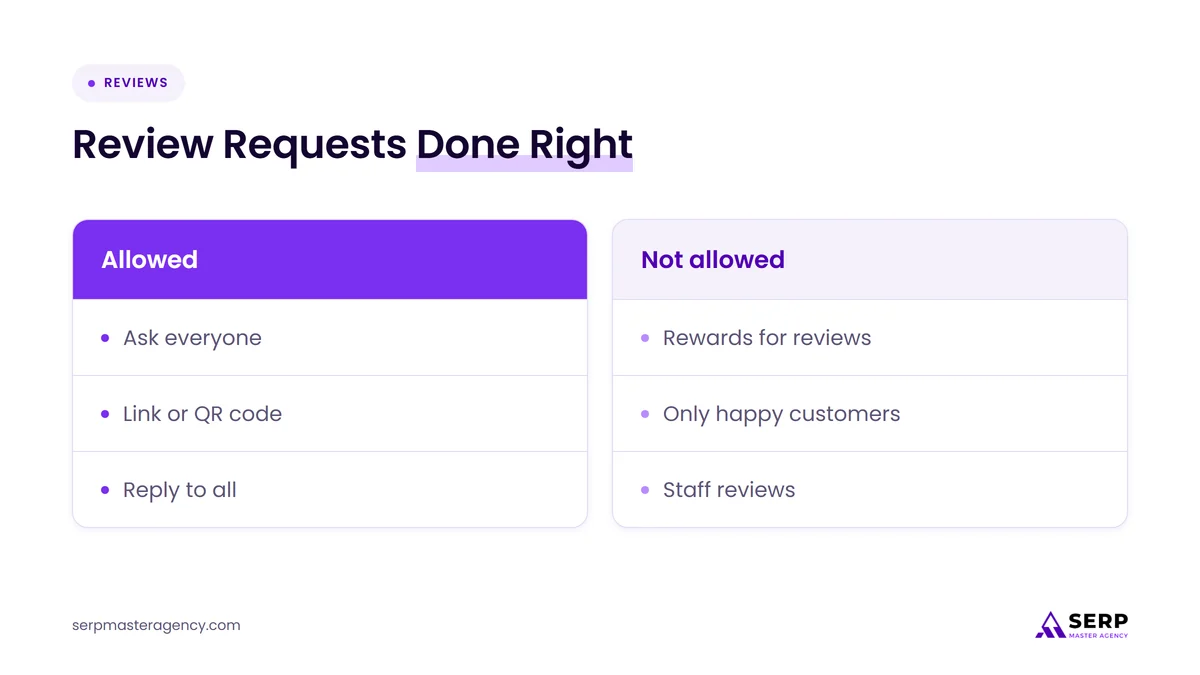
Google’s tips page suggests reminding customers with a link or QR code. Google’s prohibited content policy is strict about what isn’t allowed:
- Offering incentives, such as discounts or free service, in exchange for a review.
- Discouraging negative reviews or “selectively” asking only for positive ones, a practice often called review gating.
- Reviews from people with a conflict of interest, such as current or former employees.
- Several reviews posted from multiple accounts by, or at the request of, one person.
The easiest compliant setup is a text or email sent automatically when a job is marked complete, with the technician mentioning it before leaving. Google’s local ranking tips say replying to reviews “shows that you value their feedback”.
Watch out: a seasonal discount on a tune-up is fine. Tying that discount to a review is not.
6. Give each core service its own page
One “Services” page that lists everything gives Google very little to match a search like “heat pump repair”. Give each core service its own page, such as furnace repair, AC repair, heat pump installation, boiler service and maintenance plans, and explain what you do, what it costs to diagnose if you publish that, and the areas you cover.
Each page should answer the questions a homeowner asks before calling: which brands and systems you work on, whether you offer emergency visits, how scheduling works, and what happens on the first visit. Put your phone number near the top, and link each page from your main navigation and your homepage.
Use your Google Business Profile services list from fix 1 as the page list. Matching names across the profile and the website makes it clear to Google and to customers that they describe the same work.
Watch out: don’t create dozens of near-identical “furnace repair in [town]” pages. Google’s spam policies describe these as doorway pages. A few location pages with real local detail are fine. A copy-and-paste set is not.
7. Make your name, address and phone match everywhere
Your business name, address (if shown) and phone number should be identical on your website, your Google Business Profile, your social profiles and the directories that list you. Mismatches, such as an old number or a former trading name, make it harder for Google and for customers to trust which details are current.
Google’s guidelines add a few rules that HVAC companies often miss:
- Your business name should reflect your real-world name, with no added service descriptions or locations.
- Use “a local phone number instead of a central call center helpline number whenever possible”.
- The number must be “under the direct control of the business”, and it shouldn’t redirect people to a different business’s line.
This week, search your business name and your phone number on Google and note every listing with old details. Our guide on fixing inconsistent NAP listings explains how to clean them up in order.
Watch out: Whitespark’s survey ranks keywords in the business title highly, which tempts some companies to rename themselves “Best HVAC Furnace Repair City”. That breaks Google’s naming rules and puts the profile at risk of suspension.
8. Add LocalBusiness schema using the HVACBusiness type
Schema markup is code on your website that describes your business in a format search engines read easily. Schema.org has a specific HVACBusiness type, and Google’s documentation recommends using “the most specific LocalBusiness sub-type possible”, so an HVAC company should use HVACBusiness rather than a generic type.
Include your name, phone number with country and area code, website URL, address if it’s shown publicly and opening hours that match your Google Business Profile. Google’s documentation shows how to mark a business as open all day: set opens to 00:00 and closes to 23:59. Most WordPress SEO plugins can output this, or a developer can add it by hand.
Test the result in Google’s Rich Results Test and fix any errors before moving on.
Watch out: Google’s documentation says review and rating markup is meant for sites that capture reviews about other businesses. Don’t mark up your own star rating to try to get stars in search results, and don’t expect schema alone to change rankings. Its job is to make your details clear and consistent.
9. Make calls easy to place and easy to count
Every fix above is meant to produce phone calls, so make calling one tap on mobile and count those taps. Put a click-to-call phone link in your website header and on every service page, then track those clicks in Google Analytics 4 and watch the Calls figure in your Business Profile performance report.
In GA4, create an event for clicks on your phone links (usually through Google Tag Manager) and mark it as a key event. Google’s Analytics help explains how to mark events as key events, and standard properties can have up to 30.
In your Business Profile, the performance report shows Calls, which Google defines as “the number of times a customer clicked on the call button on your Business Profile”. The older call history feature was removed on July 31, 2024, so it is no longer an option for seeing individual calls.
Add one more step that costs nothing: ask every new caller how they found you, and log the answer in your job software.
Watch out: a tap on a call button isn’t a booked job. Compare taps with booked jobs each month so you know the real value of each channel.
How should you plan the 9 fixes across one week?
Do the profile fixes first because they are quick and visible, then reviews, then the website, and finish with tracking so you can measure what changes. A small team can split the list: an office manager handles the profile and reviews, and whoever manages the website handles pages, schema and the call link.
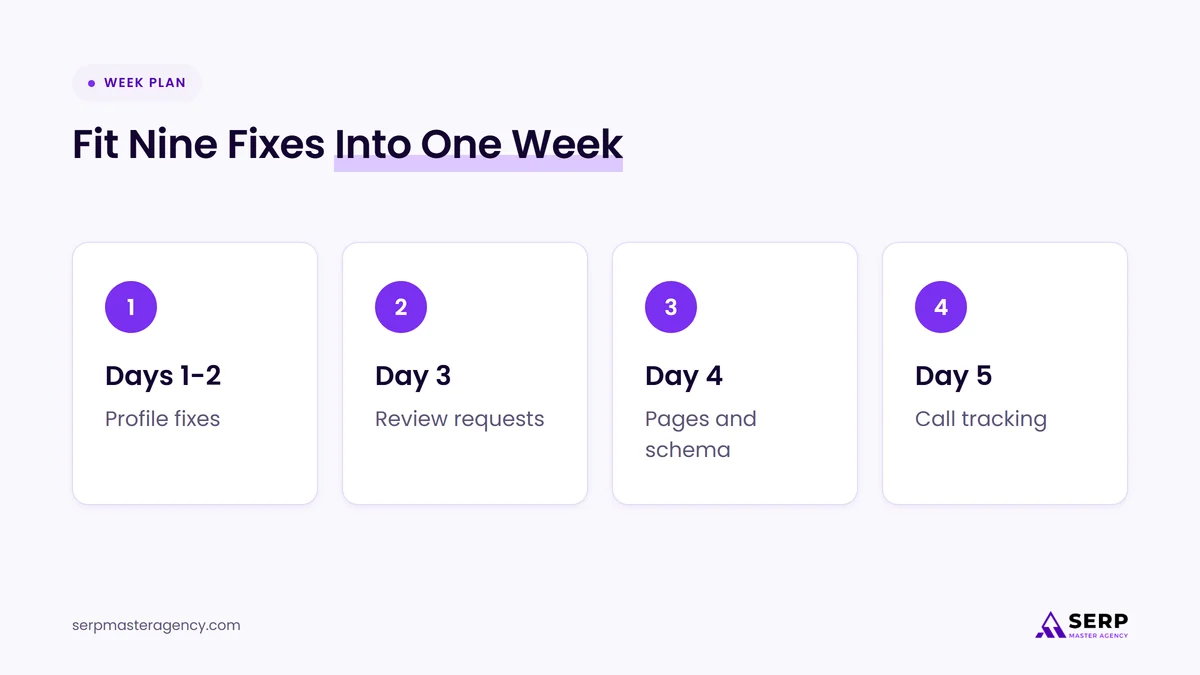
- Days 1 and 2: profile. Categories, services, hours, holiday hours, service area and photos (fixes 1 to 4).
- Day 3: reviews. Set up the review link, write the message and add it to your job completion steps (fix 5).
- Day 4: website. Plan or update your core service pages, check your details everywhere and add HVACBusiness schema (fixes 6 to 8).
- Day 5: tracking. Add click-to-call links, create the GA4 key event and note your current Calls figure as a starting point (fix 9).
Profile edits can take up to 48 hours to appear after approval, according to Google’s service area help page, so start early in the week.
Where do AI Mode booking and quote links fit for HVAC companies?
Since November 4, 2026, Google AI Mode in the US can show home service providers with links to book a time or request a quote through partner platforms: Angi, Thumbtack, Housecall Pro and Jobber, with ServiceTitan listed as coming soon. It doesn’t replace the fixes above. Ratings, service area and accurate details still shape which businesses appear.
Search Engine Journal and Search Engine Roundtable both reported the launch, and neither mentions HVAC by name. Coverage refers to home services in general. If you run your business on one of the partner platforms, check its eligibility rules this week. Jobber, for example, requires a paid subscription and a Google Business Profile connected at the same address. Our full breakdown of AI Mode booking and quote links for home services covers each platform’s requirements.
If you serve customers in the UK, Canada, Australia or New Zealand, the feature isn’t available to you yet, so the nine fixes are where your effort belongs.
What should you check 30 days after the fixes?
After a month, check whether calls, reviews and service page visits have moved, not only rankings. Compare the Calls figure in your Business Profile and the tap-to-call key event in GA4 with your starting point, count new reviews and replies, and confirm your holiday hours are showing correctly.
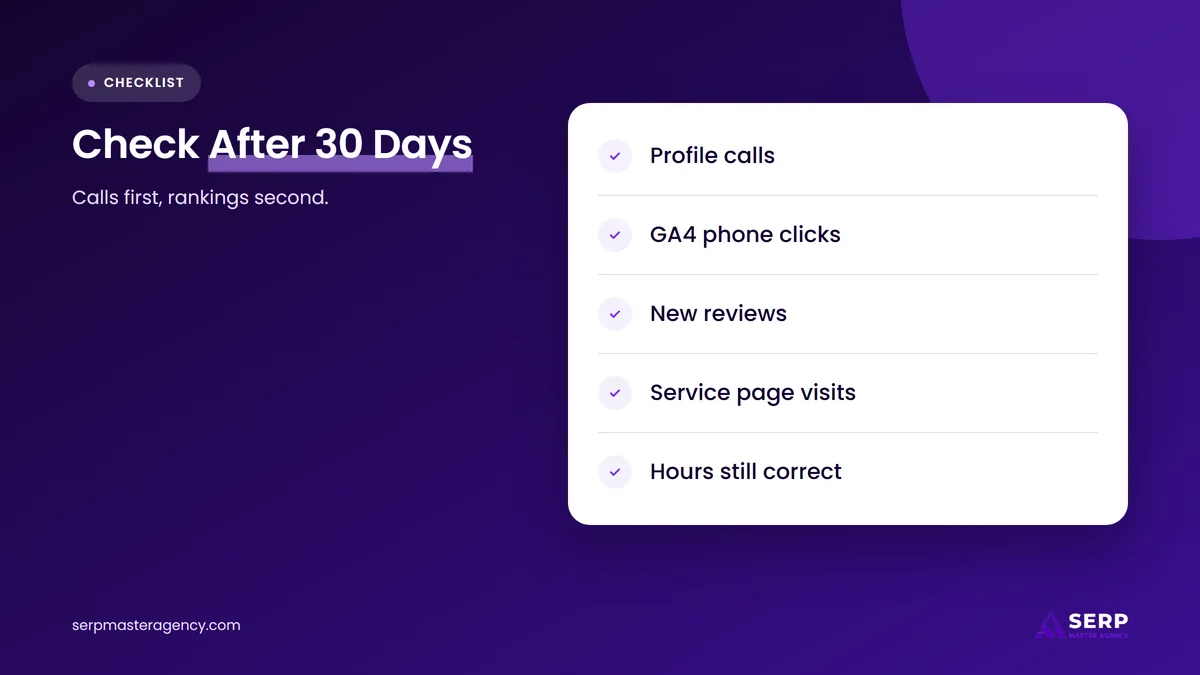
- Calls: Business Profile Calls and GA4 phone clicks against your day 5 baseline.
- Reviews: new reviews since the request process started, and whether every one has a reply.
- Service pages: which new or updated pages get visits and phone clicks.
- Profile accuracy: hours, holiday hours, categories and service area still as you set them.
- Caller source: what callers say when asked how they found you.
Google also experimented with moving Google Posts higher in the local panel in October 2026, according to Search Engine Roundtable. If you see that on your own listing, a short weekly post about seasonal services or maintenance plans is a cheap way to keep the profile current.
How does SERP Master Agency help HVAC companies with local SEO?
SERP Master Agency works with HVAC companies on the same foundations listed here: Google Business Profile setup, service pages, reviews processes, local schema and call tracking. We usually start by checking these nine areas, fixing what is wrong, and then deciding with the owner whether ongoing work makes sense for their market.
The plumbing trade faces many of the same questions, and our guide to SEO for plumbers covers ranking factors, Local Services Ads and monthly checks in more depth.
Frequently asked questions
What is the best Google Business Profile category for an HVAC company?
Choose the category that best describes the work you most want calls for. For most heating and cooling companies that is HVAC contractor, with heating contractor or air conditioning contractor added only if they describe real lines of work. Google asks for the fewest categories that describe your core business.
Should an HVAC company list itself as open 24 hours?
Only if a person answers the phone and can send a technician at any hour. Google asks for real customer-facing hours, and showing 24 hours when calls go to voicemail frustrates customers. If you offer emergency service only some nights, set the hours you can honestly cover.
Can an HVAC company offer a discount for Google reviews?
No. Google’s policy prohibits offering discounts, free service or any other incentive in exchange for a review. You can still ask every customer for a review with a link or QR code. Ask all customers the same way, not only the ones you expect to be happy.
How many service areas can an HVAC company add on Google?
You can add up to 20 service areas, based on cities, postal codes or other areas. Google says the overall area shouldn’t extend more than about two hours of driving from your base, and you can’t set it as a radius. Edits can take up to 48 hours to appear.
Can HVAC companies get booked through Google AI Mode?
In the US, home service businesses can appear in AI Mode with booking or quote links through partner platforms: Angi, Thumbtack, Housecall Pro and Jobber, with ServiceTitan coming soon. Each platform has its own eligibility rules. The feature was not available outside the US at launch.
What should an HVAC company do first?
Start with your Google Business Profile category, services and holiday hours today, because they take minutes and affect how you appear during the busiest weeks of heating season. Then set up review requests, give each core service its own page and start counting calls. If you’d like a full plan for your market, see our HVAC SEO services, our wider SEO services and the latest guidance from SERP Master Agency.
Want more calls from local searches this winter?
Tell us about your HVAC business, the areas you serve and the jobs you want more of. We’ll review your Google Business Profile and website against these nine fixes and tell you what to do first.
Sources
- Google Business Profile Help, “Tips to improve your local ranking on Google”, accessed November 6, 2026. https://support.google.com/business/answer/7091
- Google Business Profile Help, “Guidelines for representing your business on Google”, accessed November 6, 2026. https://support.google.com/business/answer/3038177
- Google Business Profile Help, “Manage your service areas for service-area & hybrid businesses”, accessed November 6, 2026. https://support.google.com/business/answer/9157481
- Google Business Profile Help, “Manage your services on your Business Profile”, accessed November 6, 2026. https://support.google.com/business/answer/9455399
- Google Business Profile Help, “Manage your Business Profile photos & videos”, accessed November 6, 2026. https://support.google.com/business/answer/6103862
- Google Business Profile Help, “Tips to get more reviews”, accessed November 6, 2026. https://support.google.com/business/answer/3474122
- Google Maps User Contributed Content Policy, “Prohibited & restricted content”, accessed November 6, 2026. https://support.google.com/contributionpolicy/answer/7400114
- Google Business Profile Help, “Understand your Business Profile performance & insights”, accessed November 6, 2026. https://support.google.com/business/answer/9918094
- Google Business Profile Help, “Changes to Google Business Profile chat and call history”, accessed November 6, 2026. https://support.google.com/business/answer/14919056
- Google Search Central, “Local business (LocalBusiness) structured data”, accessed November 6, 2026. https://developers.google.com/search/docs/appearance/structured-data/local-business
- Google Search Central, “Spam policies for Google web search”, accessed November 6, 2026. https://developers.google.com/search/docs/essentials/spam-policies
- Schema.org, “HVACBusiness”, accessed November 6, 2026. https://schema.org/HVACBusiness
- Google Analytics Help, “Mark events as key events”, accessed November 6, 2026. https://support.google.com/analytics/answer/13128484
- Whitespark, “2026 Local Search Ranking Factors Report”, November 6, 2025. https://whitespark.ca/local-search-ranking-factors/
- Search Engine Journal, “Google Adds Home Service Booking & Quote Links To AI Mode”, November 4, 2026. https://www.searchenginejournal.com/google-ai-mode-home-services-booking-quote-links/595871/
- Search Engine Roundtable, “Google AI Mode Integrates With Home Services Booking”, November 5, 2026. https://www.seroundtable.com/google-ai-mode-home-services-booking-42459.html
- Search Engine Roundtable, “Updated Google Maps Policy: What Merchants Can’t Post In Listings Or Posts”, October 6, 2026. https://www.seroundtable.com/google-maps-policy-listings-or-posts-42228.html
- Search Engine Roundtable, “Google Moves Google Posts Higher Up On Local Panel”, October 19, 2026. https://www.seroundtable.com/google-posts-higher-42319.html

Suraj Rana is a highly regarded SEO expert specializing in the dental industry. His expertise lies in crafting strategic SEO marketing plans to help new or expanding businesses increase their online visibility and attract more customers. Suraj Rana’s skills extend to improving website rankings and boosting organic search visibility, thereby enhancing web traffic and return on investment for businesses.